Automation in B2B SaaS Workflows: The Build Guide

Founder, Grow Predictably · 15+ yrs building B2B revenue systems
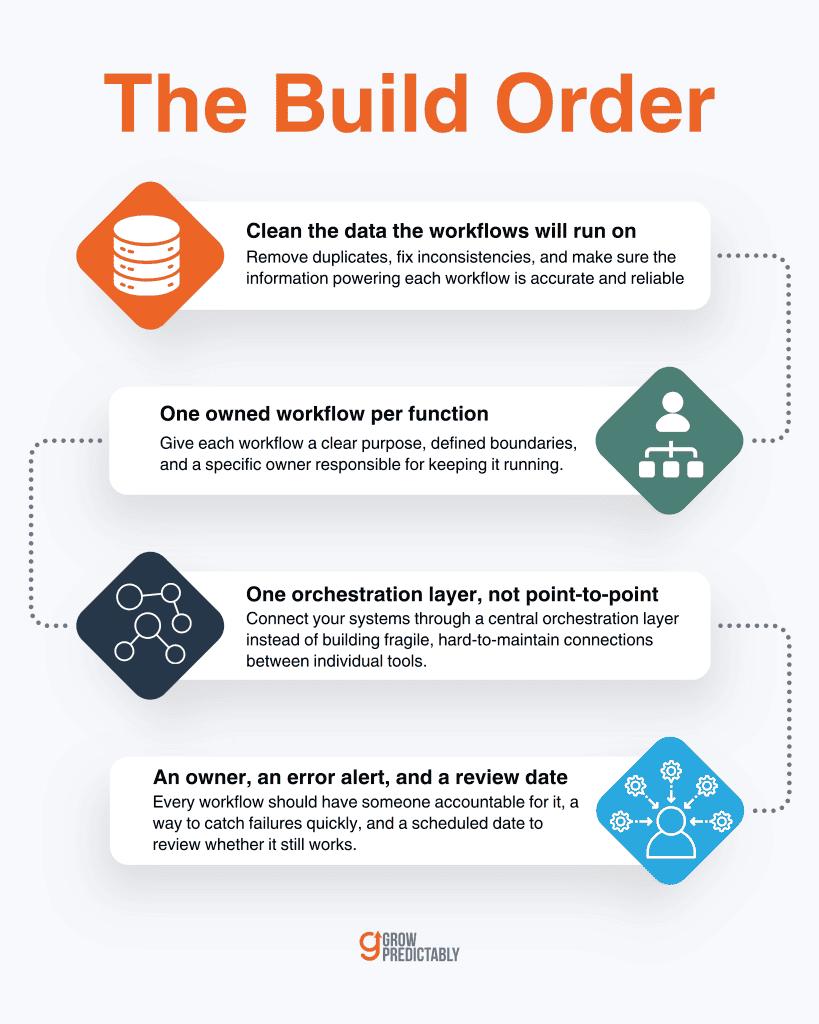
TL;DR: Automation in B2B SaaS workflows succeeds or fails on build order. Clean the records the workflows will run on, ship one owned workflow per function against a real trigger, connect systems through a single orchestration layer instead of point-to-point patches, then give every workflow an owner, an error alert, and a review date. Automation amplifies whatever process it runs on, so the order is the discipline.
Key Takeaways
- Build in order: clean data, one workflow per function, an orchestration layer, then named ownership. Skipping the first step is why automations produce wrong records faster.
- Most automation is no longer an IT project. In Workato’s platform data, 44% of automated processes are built outside of IT, and business operations teams build more of them than any other group.
- Pick the tool class before the vendor name: one orchestration layer, the systems it connects, and one work-management home. Anything past that is usually sprawl.
- Marketing is the furthest-along function, and the AI layer inside it is real for drafting and admin work rather than for judgment calls.
- Every workflow needs an owner, an error alert, and a review date. Unowned automation fails silently, which costs more than it ever saved.
The pattern looks the same in most B2B SaaS teams. Someone exports a list from the CRM, cleans it by hand in a spreadsheet, and pastes it into the email tool.
Someone else rebuilds the same weekly report every Monday. The team knows this is wasteful, so they buy Zapier, wire up four automations in an afternoon, and three months later the work is still being done by hand around automations that are technically still running.
If that is your team, this guide is the build: what to build, which classes of tools to build it on, and in what order. Whether and when to automate at all is a separate decision with its own guide, so this page starts one step after you have made it.
What counts as workflow automation in B2B SaaS?
Workflow automation in B2B SaaS is software that runs a repeatable, multi-step process on a trigger instead of by hand. Think of processes like:
- Lead routing and enrichment: a new lead comes in, gets scored, and lands with the right rep automatically
- Customer onboarding: a new signup triggers a sequence of welcome emails, setup tasks, and check-ins
- CRM writeback: product usage data flows back into the CRM without anyone copying and pasting
- Scheduled reporting: reports assemble themselves on a set cadence, no manual pull required
The build has an order, and I’d argue that order matters more than which tool you pick.
The second thing worth knowing is who’s actually building this now. Workato’s 2024 Work Automation and AI Index, drawn from anonymized platform data across 1,055 companies and roughly 82,000 automated processes between 2021 and 2023, found that:
- 44% of all automated processes are built outside of IT
- Business operations teams built 27.7% of all processes in 2023, more than any other group
- Over half the companies in the dataset ran automations in four or more departments
In other words, the person building your lead routing is probably the same person who owns lead routing day to day.
That raises the build standard rather than lowering it. In my experience, an operator who owns a process usually gets the logic right, and the failure design wrong, because nobody taught them to plan for the trigger that misfires at 2 a.m.
One boundary before we get into the build itself: this guide covers how to build. The prior question of whether and when to automate B2B SaaS processes, and what to sequence first, belongs to its own guide and isn’t re-argued here.
Why do automation builds fail in B2B SaaS?
Automation builds fail for two reasons: the process underneath was never defined, and the data underneath was never cleaned.
Automation amplifies whatever it runs on. Point it at a clear process with reliable records, and it compounds. Point it at a mess, and it produces an automated mess, just faster and with more false confidence.
The symptom is easy to recognize. The workflows exist, and the team still does the work by hand around them:
- Someone re-checks every routed lead because routing has been wrong before
- Someone keeps a shadow spreadsheet because the automated report missed a segment once
In cases like these, the automation didn’t remove the work. It added a second system that now has to be audited.
The worse version is quieter: the automation runs, nobody checks it, and it writes wrong records at speed for a month. By then, I’ve seen the cleanup end up bigger than the manual work ever was.
Both problems trace back to the same cause. The workflow was built on dirty data and an undefined process, so it inherited the ambiguity and executed it at machine speed:
- Duplicate contact records produce duplicate emails
- An inconsistent lifecycle field produces a routing rule that silently drops one segment
None of that is a tool problem, which is why changing tools never fixes it.
The common response is to add another tool, and that’s the anti-pattern I’d flag first.
A new platform on a broken process just buys you an integration surface, a subscription, and a second home for the same ambiguity. The real fix is ordering: clean the records, define the process in writing, build one workflow, then build the next.
What belongs in your automation stack in 2026?
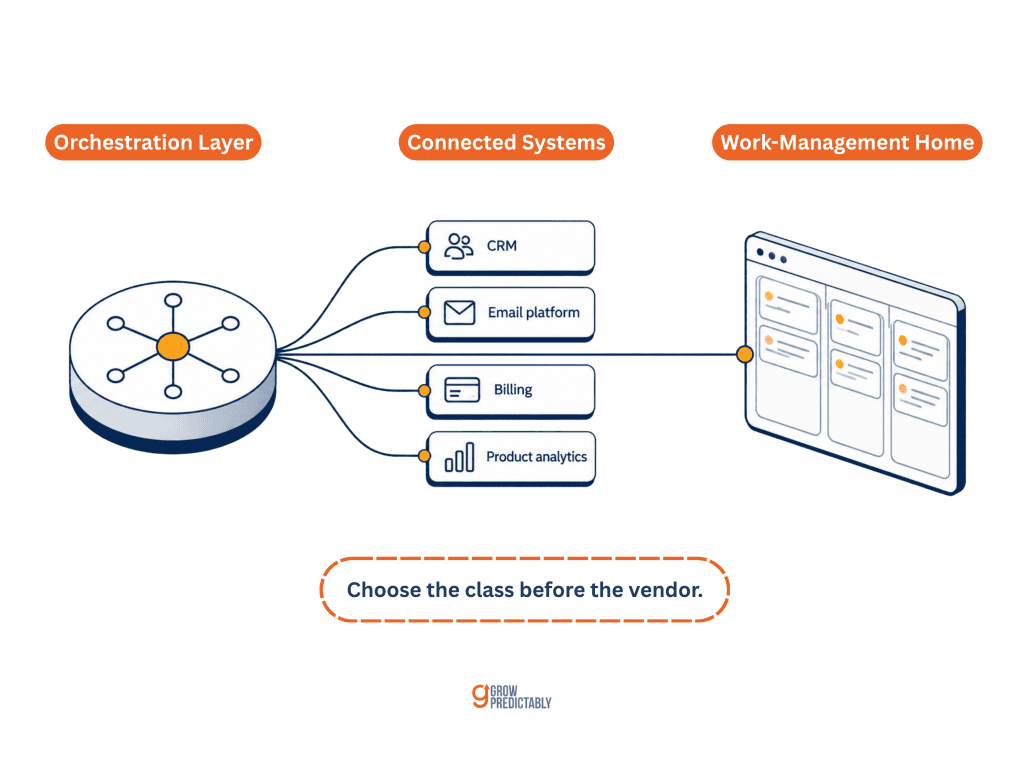
Three classes of tools cover most B2B SaaS teams:
- An orchestration layer that moves data between systems
- The connected systems themselves, like your CRM and product analytics
- A work-management home where humans pick up what the automation hands off
Choose the class before you choose the vendor.
The three tool classes
The orchestration layer is the piece I see teams get wrong when they skip it. Zapier and Make are the common no-code choices, and n8n is the usual pick for a team that wants to self-host. Its job is to be the single place where cross-system logic lives, so a change to your lead-routing rule happens once rather than across four separate native integrations.
The connected systems are tools you already pay for. The real build work here is deciding which system owns which field, because two systems that both believe they own the lifecycle stage will disagree, and the automation carries that disagreement into every downstream record.
The work-management home is where an automated handoff becomes a human task. ClickUp and Airtable are the common exemplars. Without one, your automations create work that lands nowhere and gets done by whoever happens to notice.
Choosing by connection, not by feature list
The selection question isn’t which tool has the most features. It’s what has to connect to what, and who maintains it after launch. Write down:
- Every system that must exchange data
- The direction each exchange runs
- The field that identifies the same record in both systems
That page is your selection artifact, and it disqualifies more tools than a feature comparison ever will.
The maintenance half is where sprawl gets punished. MuleSoft’s 2026 Connectivity Benchmark Report, a survey of 1,050 IT leaders, found that the average organization now runs 957 separate applications, up from 897 the year before, and that only 27% of them are actually connected. Those are enterprises with integration teams.
A twelve-person B2B SaaS company reaching the same sprawl gets the failure mode without the budget for the recovery.
The recovery move is consolidation. List every tool, name the one process each tool serves, and cut the ones whose process is already served elsewhere. Fewer systems, well connected, beat a wide stack nobody can trace.
One last discipline, and it’s the one I see skipped most: put a review date on your stack document, because vendor names churn faster than internal documentation does. For example:
- SureTriggers, named across plenty of automation roundups, is now OttoKit
- Airtable agreed on August 4, 2026, to be acquired by Bending Spoons
Neither fact changes what the tool class does, but both change what you re-check before recommending a vendor internally.
How do you automate marketing workflows?
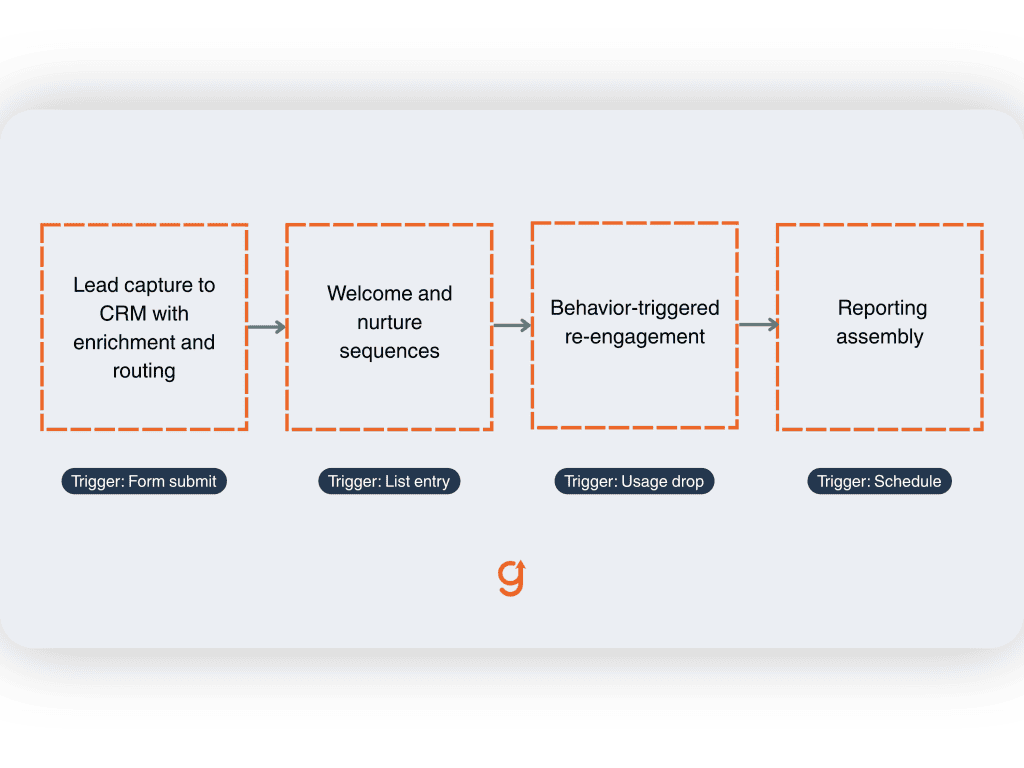
Automate marketing in this order: lead capture into the CRM with enrichment and routing, then welcome and nurture sequences, then behavior-triggered re-engagement, then reporting assembly.
Each build fires on a real event rather than a batch job, and each writes back to a single system of record.
Lead capture to CRM is the first build for almost every team, and it exposes data problems immediately:
- The form submits, and the record is created or matched
- Enrichment fills the firmographic fields
- The routing rule assigns an owner
If your duplicate handling was never defined, you find out here instead of three months later.
Sequences come second. The craft of writing them well is its own subject, covered in B2B SaaS email drip campaigns. The automation work is the trigger and the exit condition: what event starts the sequence, and what event stops it.
A nurture sequence that keeps sending after someone books a demo is, in my experience, the most common self-inflicted wound in this category.
Behavior-triggered re-engagement is where product data earns its keep. Think:
- A usage drop
- A feature never activated
- A renewal date approaching
Those triggers are what separate a B2B SaaS workflow from a generic marketing setup, because you have product telemetry that a services business doesn’t.
Then there’s the AI layer, which deserves an honest frame. In HubSpot’s 2026 State of Marketing report, based on data from more than 1,500 global marketers:
- 86.4% of marketing teams say they use AI in at least a few areas
- Administrative task automation is used extensively by 35.6% and occasionally by another 40.5%
- Roughly a third of teams report saving 10 to 14 hours a week, with another third saving more than 15
The savings are real, and they cluster in drafting and admin work rather than in judgment.
AI is such a disruptive technology. And whenever there’s a disruptive technology, it creates huge opportunities to experiment.
Johann Wrede, CMO of UserTesting, in HubSpot’s 2026 State of Marketing report
I’d read that as permission to experiment inside a workflow you already own and already monitor, rather than as a reason to hand an undefined process to a model.
How do you automate onboarding, ops, and reporting workflows?
Outside marketing, the highest-return builds are milestone-triggered onboarding, data syncs between systems that people reconcile by hand today, and scheduled report assembly. Automate the schedule and the record-keeping, and keep diagnosis and relationship conversations human.
Customer onboarding
Onboarding automation runs on milestones rather than on the calendar:
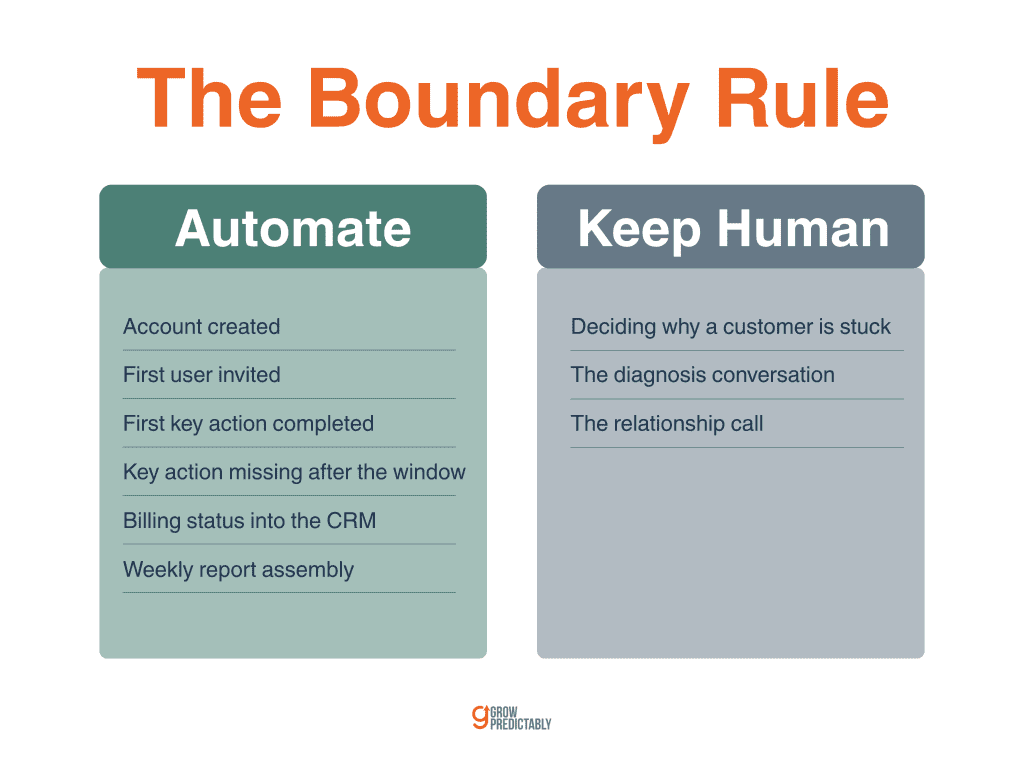
- Account created
- First user invited
- First key action completed
- The absence of that key action after a set window
Each of those fires a message, a task, or both. The sales-to-success handoff belongs here too, because the automation can copy what sales learned into the field the success team actually reads.
The boundary rule is short: if a step is a scheduled reminder or a record being written, automate it. If a step is a person deciding why a customer is stuck, don’t.
Internal ops and reporting
Data syncs are the unglamorous, highest-return build in this category:
- Billing status into the CRM
- CRM stage into the product database
- Support volume into the weekly report
Nobody demos these, but in my experience they remove more manual hours than anything else on the list.
Scheduled reporting comes second. A report that assembles itself on Monday morning is worth building even when a human still writes the interpretation, because assembly is the part that gets skipped when the week gets busy.
Scope grows once the real triggers surface, and I’d say the growth is usually correct. On one client build, what started as a single scenario turned into four, and the extra three made the automation more flexible rather than more fragile.
Sales-motion workflows and outbound prospecting are separate disciplines with their own tradeoffs, covered in B2B sales process automation and B2B outreach automation.
How do you keep automations from silently breaking?
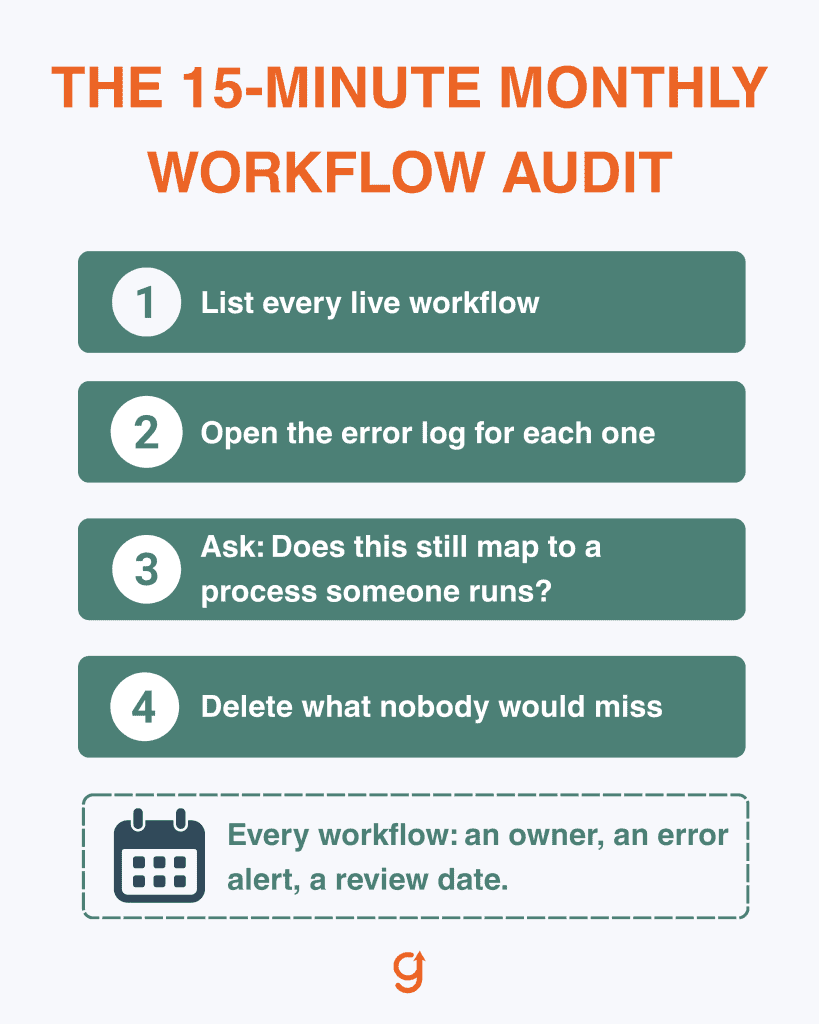
Give every workflow three things:
- A named owner
- An error alert that reaches a human
- A review date
Silent failure is the dominant failure mode in workflow automation, because a broken automation looks exactly like a quiet one until somebody goes looking.
Ownership comes first. A workflow with no name attached is a workflow nobody checks, and in most B2B SaaS teams the owner should be whoever owns the underlying process.
Error design comes second. Decide in advance what happens when:
- The trigger misfires
- The API changes
- A record arrives with a required field missing
The default behavior in most no-code tools is to stop and log, which is safe and invisible at the same time. Route those logs into a channel a person actually reads, and the invisible half goes away.
I’ve shipped this failure myself. An automated transform on my own site, written to remove duplicated FAQ blocks, stripped FAQ content from article bodies and re-rendered only the heading-shaped questions. FAQs written in any other format vanished, and FAQ structured data dropped to zero on at least one live article before anyone noticed. The rule I wrote afterward was simple: never strip content unless the replacement was successfully extracted first.
A migration sweep taught me the same lesson from the other side. I checked all 375 URLs against the new environment before the switch, and five failed persistently while still returning 200 on the live site. No dashboard reported anything wrong.
That’s the case for the third item. Once a month, take 15 minutes to:
- List every live workflow
- Open its error log
- Answer one question about each: does this still map to a process someone actually runs?
A workflow nobody would miss gets deleted rather than maintained.
Where should your first automation build point?
Aim it at the journey stage that is capping growth right now, rather than the one that is easiest to wire up.
The build order is the method: clean the records, ship one owned workflow per function against a real trigger, connect through one orchestration layer, and give every workflow an owner, an alert, and a review date. None of that requires a developer or a new platform.
Automation amplifies the process it runs on, which is why the diagnosis comes before the build. Working out which stage is capping growth is the job of a constraint-first marketing strategy.
Run the free growth scan at scan.growpredictably.com, find the constraint, then build the first workflow against it.
Frequently Asked Questions
Do you need a developer to build B2B SaaS workflow automation?
Usually not. In Workato’s platform data covering 1,055 companies, 44% of all automated processes are built outside of IT, and business operations teams build more of them than any other group. The real constraint is process clarity and maintenance ownership rather than code. A workflow nobody owns fails silently no matter who built it.
What should a B2B SaaS company automate first?
That is a sequencing decision, and it has its own guide. The short answer is the workflow sitting at the journey stage currently capping growth, built on records that are already clean. Automating a busy but healthy stage feels productive and moves nothing, because automation amplifies whatever process it runs on rather than fixing it.
How many automation tools does a small SaaS team need?
Three classes cover most teams: one orchestration layer that moves data between systems, the systems being connected such as the CRM and product analytics, and one work-management home where people pick up what the automation hands off. More tools than that is usually sprawl, and sprawl becomes its own maintenance job before it becomes a capability.
How long does it take to implement workflow automation?
One well-scoped workflow ships in days. The honest timeline cost sits upstream, in cleaning the records and defining the process in writing, and teams that skip those two steps are the ones whose builds fail. Budget the cleanup rather than the tool setup, and build one workflow per function instead of seven at once.
What is the difference between workflow automation and marketing automation?
Marketing automation is one function’s slice: sequences, scoring, campaign triggers. Workflow automation is the whole discipline across marketing, onboarding, internal operations, and reporting. A marketing automation platform is one of the systems an orchestration layer connects, not a substitute for one. Teams that conflate the two end up with campaign tooling and no cross-system logic.
How do you know whether an automation is worth keeping?
Give every workflow an owner, an error alert that reaches a person, and a review date. At the review, ask three things: does it still map to a process someone runs, did it error silently, and would anyone notice if it stopped? A workflow nobody would miss gets deleted rather than maintained.
About the author
Brian helps B2B founders install marketing + automation engines powered by Co-Thinking with AI. With 15+ years building predictable revenue systems, he's worked with SaaS, agency, and service businesses on 90-day done-with-you growth accelerators.
Ready to see your real growth gap?
Two minutes in the Growth Gap Scan and you walk away knowing the one thing capping your pipeline. Free, no obligation.